Want to show support?
If you find the information in this page useful and want to show your support, you can make a donation
Use PayPal
This will help me create more stuff and fix the existent content...
If you find the information in this page useful and want to show your support, you can make a donation
Use PayPal
This will help me create more stuff and fix the existent content...
requirements.txt is a file that is going to include any other libraries or packages that we want our application to use in Python..exeGet .exe, execute it to install and run ensurepip
# powershell -ExecutionPolicy Bypass -Command "C:\install_python3.ps1"
Write-Output "Python3 Install log" > C:\INSTALL_PYTHON3.log

$python_version="3.8.0"
$python_install_path="C:\Python38"
$dir="C:\PYTHON_${python_version}_INSTALL"

function Install($app, $appArgs, $verb)
{
    Write-Output "Installing $app..."
    Write-Output "$app $appArgs $verb"

    $status = (Start-Process -FilePath "$app" -ArgumentList "$appArgs" -Wait -Verb $verb -PassThru).ExitCode
    if ($status -eq 0)
    {
        Write-Output "Install Passed!"
    }
    else
    {
        Write-Output "Install Failed!"
    }
}

# Copy Python version from Share and run installer
Install "$dir\python-${python_version}-amd64.exe" "/SILENT /quiet InstallAllUsers=1 DefaultAllUsersTargetDir=$python_install_path" "RunAs" >> C:\INSTALL_PYTHON3.log

# Install pip packages
cd $python_install_path
.\python.exe -m ensurepip >> C:\INSTALL_PYTHON3.log
.\python.exe -m pip install --no-index --find-links=$dir\.pypi3 -r $dir\requirements_py3_win.txt >> C:\INSTALL_PYTHON3.log
.tgzUntar, Compile with configure, make altinstall and create symlink
PYTHON_VERSION=3.8.0
PYTHON_PREFIX=/usr/local
DIR="${HOME}/PYTHON_${PYTHON_VERSION}_INSTALL"
mkdir - p
# curl -O https://www.python.org/ftp/python/3.8.0/Python-3.8.0.tgz

cd /root

# untar python .tgz
mkdir -p /root/tmp/
rm -rf /root/tmp/Python-$PYTHON_VERSION
tar -xzf ${DIR}/Python-$PYTHON_VERSION.tgz -C /root/tmp/ > /root/INSTALL_PYTHON3.log 2>&1

# Configure and compile Python
echo "Compiling python3..." >> /root/INSTALL_PYTHON3.log 2>&1
echo "Compile & install Python 3 for more info see /root/INSTALL_PYTHON3.log"
cd /root/tmp/Python-$PYTHON_VERSION
./configure --prefix=$PYTHON_PREFIX --with-ensurepip=yes >> /root/INSTALL_PYTHON3.log 2>&1
sudo make altinstall >> /root/INSTALL_PYTHON3.log 2>&1

# Create a symlink to python3
if [ -h /usr/local/bin/python3 ]; then
    echo "Link exists, continuing python3 setup" >> /root/INSTALL_PYTHON3.log 2>&1
else
    sudo ln -s $PYTHON_PREFIX/bin/python${PYTHON_VERSION::-2} /usr/local/bin/python3
fi
echo "Compile python3 done." >> /root/INSTALL_PYTHON3.log 2>&1

# Install pip packages
cd /root
echo "Installing python3 packages" >> /root/INSTALL_PYTHON3.log 2>&1
/usr/local/bin/python3 -m pip install --no-index --find-links=${DIR}/.pypi3 -r ${DIR}/requirements_py3_lin.txt >> /root/INSTALL_PYTHON3.log 2>&1
echo "Compile and install python3 DONE!" >> /root/INSTALL_PYTHON3.log 2>&1
venv in Pythonpip python3 -m pip install --upgrade pipcd C:\ && C:\\Python38\python.exe -m pip install --upgrade pipvirtualenv pip package (if not already installed with python)python3 -m pip install virtualenvcd C:\ && C:\\Python38\python.exe -m pip install virtualenvcd /root/<folder where py3venv folder will be created> && python3 -m venv py3venvcd C:\<folder where py3venv folder will be created> && C:\Python38\python.exe -m venv py3venvcd /root/py3venv && source bin/activate python -m pip install --no-index --find-links=/root/PYTHON_3.8.0_INSTALL/.pypi3 -r /root/PYTHON_3.8.0_INSTALL/requirements_py3_lin.txt
  cd C:\py3venv\Scripts && activate.bat
  python -m pip install --no-index --find-links=C:\PYTHON_3.8.0_INSTALL\.pypi3 -r C:\PYTHON_3.8.0_INSTALL\requirements_py3_win.txt
deactivatecd C:\py3venv\Scripts && deactivate.batcd && rm -rf /root/py3venvcd C:\ && RMDIR /S /Q C:\py3venv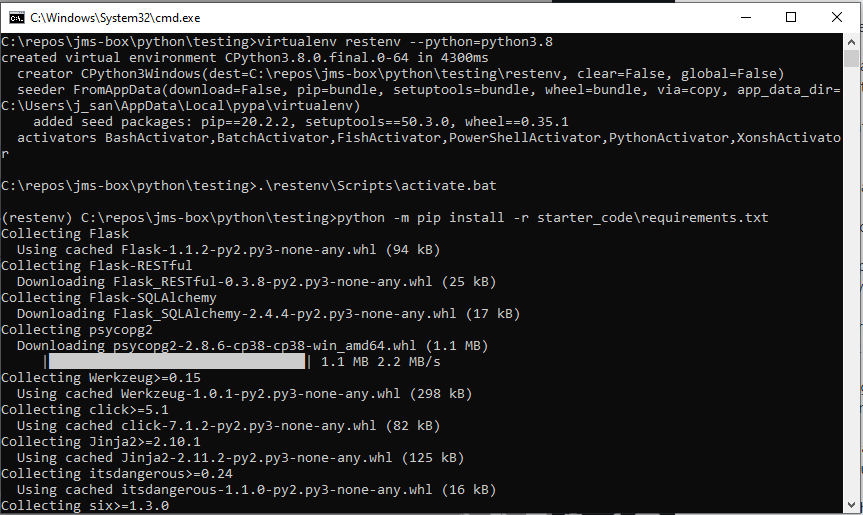
venvMake sure you have venv installed via pip (pip install virtualenv)
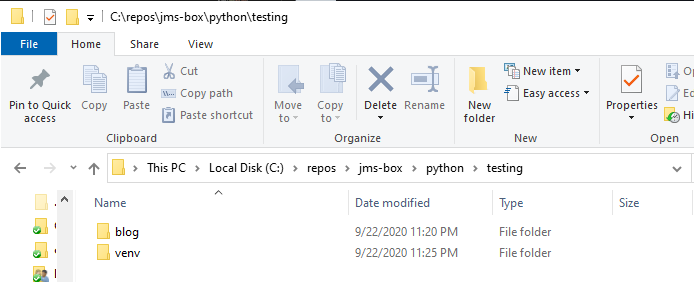
Init a venv at the same level of your project directory with virtualenv venv --python=python3.8

In PyCharm create a new project set Location to be folder project and interpreter from venv folder created
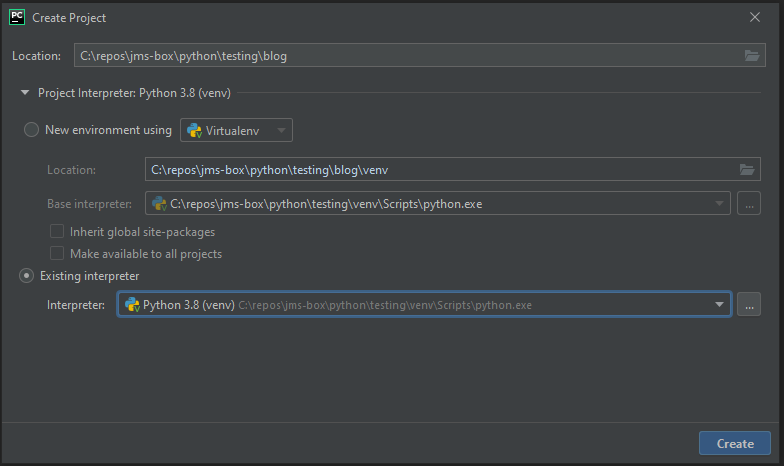
It is recommended/safer to create a virtualenv for every project but you can also share a venv between multiple projects
The module for the built-in functions like print and input is builtins
''' Triple quote allows you to create a multiline string
ord() takes a function accepts a string of length 1 and returns the Unicode integer equivalence, for common chacters like letters and number the value returned is the same as ASCII code since Unicode is just a more general standard
chr() take an integer representing unicode of the character and returns a string with that character
mult_str =  '''
 -------
 This is my  multi-line string
 -------
'''
print(mult_str)
print(ord('A'))   # return 65=0x41
print(chr(65))    # return 'A'
print(chr(0x41))  # return 'A'
f and {} in strings
name =  "Pepe"
print(f"Hello, {name}")
{} that will be later replaced by using the .format() function
name =  "Pepe"
greeting = "Hello, {}. Today is {}"
day = "Monday"
with_name = greeting.format(name, day)
print(with_name)
input() function
my_input = input("Give input")
print("You input: {}".format(my_input)
my_list = ["bob", "rolf", "anne"] my_tuple = ("bob", "rolf", "anne") my_set = {"bob", "rolf", "anne"}
tuple parenthesis () are only needed when Python might be confused as to whether you wanna create a tuple, or these are values in another collection.x, y = (1, 2))
# destructuring in loop
people = [("Jose", 7, "eng"), ("Juan", 8, "spa"), ("Yin", 6 ,"jap")]
for name, age, language in people:
    print(f"{name} age {age}, speaks {language}")

# collector of first elements
*head, tail = [("Jose", 7, "eng"), ("Juan", 8, "spa"), ("Yin", 6 ,"jap")]
print(head)
# collector of last elements
head, *tail = [("Jose", 7, "eng"), ("Juan", 8, "spa"), ("Yin", 6 ,"jap")]
print(tail)
dict in python need keys to be hashable (for example strings or numbers)items() method (which return a 'list' of tuples, each tuple is being destructured into separate variables
students_attendance = {"Jose": 7, "Juan": 6, "Jesus": 9}
for student, attendance in students_attendance.items()
    print(f"{student} attendance: {attendance}")
#           0    1    2    3
letters = ["a", "b", "c", "d"]
print(letters[0:2], "equals", letters[:2])  # get [a,b]
print(letters[0:3], "equals", letters[:3])  # get [a,b,c]
print(letters[1:2])  # get [b]
print(letters[1:])   # get [b,c,d]
is and inis will return false since they are stored in different places in memory, they are not exactly the same thingx1 = [1, 2] x2 = [1, 2] print(x1==x2) print(x1 is x2)
in operator checks for element in collection
number =  7
while True:
    user_in = input("Play? (Y/n)")
    if user_in == "n":
        break

    user_number = input("Give me a number: ")
    if user_number == number:
        print("Guess!")
    elif user_number-number in (1, -1):
        print("Off by one")
    elif abs(user_number-number) > 1:
        print("Off by more than one")
    else:
        print("No guess")
rangestart, stop and step
for r in range(5):
    print(r)

for r in range(0, 10, 2):
    print(r)

print(list(range(0, 20, 4)))
def add(x, y) x and y are parameters)add(1, 2) 1 and 2 are arguments)*args* for example *args it is equivalent to say args is a tuple where each element is a single parameter
def multiply(*args):
    total = 1
    for arg in args:
        total *= arg
    return total

def add(x, y):
    return x + y

def apply(*args, operator):
    if operator == "*":
        return multiply(*args)
    elif operator == "+":
        return sum(arg)
    else:
        return -1
    return total

nums = [1, 2, 3, 4]
print(multiply(*nums))

xy = {"x": 2, "y": 3}
print(add(**xy))

print(apply(1,2,3,4, operator="*"))
**kwargs** for example **kwargs it is equivalent to say kwargs is a dict with key:value pairs
def named(**kwargs):
    print(kwargs)

names  = {"jose": 29, "jesus": 30}
named(**names)

# Collect al positional arguments into args
# and all named arguments into kwargs
def both(*args, **kwargs):
    print(args)
    print(kwargs)

both(1,2, "jose", user_pass="pass", user_id=142)
from operator import itemgetter

def search(sequence, expected, finder):
    for elem in sequence:
        if finder(elem) == expected:
            return elem
    raise RuntimeError(f"Could not find an element with {expected}")

friends = [
    {"name": "Rolf Smith", "age": 24},
    {"name": "Adam Wool", "age": 30},
    {"name": "Anne Pun", "age": 27},
]

print(search(friends, "Rolf Smith", itemgetter("name")))
# Equivalent with lambda functions
print(search(friends, "Bob Smith", lambda friend: friend["name"]))
self always refer to the object/instance of the class
Methods that start with __ are special methods (a.k.a. magic methods or dunder methods) that are part of python objects and are called in certain situations, besides most things in python are objects so most of things have these
__repr__ conventionally returns a str that can be used to tell the users of our class how to recreate the original object very easily. if you have __str__ usually takes precedence
Instance methods refer to all methods that user self (in other words methods that use the object as first parameters) therefore you need an object to call these type of methods. Used to modify object properties or change the state of the object
Class methods methods shared by all objects of the class, they get a class reference through the cls parameter. Often used as factories of objects to create object in a specific way
Static methods methods also shared by all objects of the class but have no reference to the class or object, they are more like functions that live inside the class but don't use the class or object for anything. Helper methods for the class but that don't use r modify its properties
class Student:
    TYPES= ("PhD", "Masters")
    def __init__(self, name, type, grades):
        self.name = name
        self.type = type
        self.grades = grades
    def average(self):
        return sum(self.grades) / len(self.grades)
    def __repr__(self):
        return "".format(self.name, self.grades)
    def instance_method(self):
        print("Instance method of object: {}".format(self))
    @classmethod
    def class_method(cls):
        print("Class method of class: {}".format(cls))
    @staticmethod
    def static_method():
        print("Called static method: {}".format(cls))
    @classmethod
    def masters_student(cls, name, grades):
        # Identical to 'return Student(name=name, type=Student.TYPES[1], grades=grades)'
        return cls(name=name, type=cls.TYPES[1], grades=grades)
#    def __str__(self):
#        return "{}".format(self.name)

student = Student("Pepe", "Masters" , (89, 90, 93, 88, 97))
print(Student.average(student)) # Identical to student.average()
student.instance_method()
Student.class_method() # Identical to student.class_method() or Student.class_method(Student)
Student.static_method() # Identical to student.static_method()

student_mas = Student.masters("Jose", (89, 90, 93, 88, 97))
class Device:
    def __init__(self, name, connected_by):
        self.name = name
        self.connected_by = connected_by
        self.connected = True
    def __str__(self):
        return f"Device {self.name!r} ({self.connected_by})"
    def disconnect(self):
        self.connected = False

class Printer(Device):
    def __init__(self, name, connected_by, capacity):
        super(Printer, self).__init__(name, connected_by) # - Python2 and Python3+
        # super().__init__(name, connected_by)  # Python3+ only
        self.capacity = capacity
        self.remaining_pages = capacity
    def __str__(self):
        # return f"{super().__str__()} ({self.remaining_pages} pages remaining)" # Python3+ only
        return f"{super(Printer, self).__str__()} ({self.remaining_pages} pages remaining)" # Python2 and Python3+

printer = Printer("Printer", "USB", 5)
print(printer)
def function_name(variable_name : <type>) -> <return type>
# Valid but not following type hinting convention
def list_average(sequence: list) -> float:
    return sum(sequence) / len(sequence)

# Using the types from `typing` module is the convetion
from typing import List
def list_avg(sequence: List) -> float:
    return sum(sequence) / len(sequence)

# Type hint in classes
class Book:
    def __init__(self, name: str, page_count: int):
        self.name = name
        self.page_count = page_count
    def __repr__(self) -> str:
        return f""
    @classmethod
    def hundred_pages_book(cls, name: str) -> "Book": # Specify Name of class as string to signal it returns a Book object for same class
        return cls(name=name, page_count=100)

class BookShelf:
    def __init__(self, books: List[Book]):
        self.books = books
    def __str__(self) -> str:
        return f"BookShelf with {len(self.books)} books: {self.books}"

book1 = Book("Don Quijote", 352)
book2 = Book("Pedro Paramo", 200)
book100 = Book.hundred_pages_book("My Bio")
my_shelf = BookShelf([book1, book2, book100])
print(my_shelf)
__name__ global variable in python that changes depending on the file that it is executing. The file you run becomes __main__
Python will look for modules in sys.path, it is the import paths where Python will look in order to find files to import and sys.modules stores what is imported
python C:\\code\\python\\snippets\mycode.py python will look in C:\\code\\python\\snippets\ because there is where mycode.py exists)PYTHONPATHOlder versions of python require the __init__.py file to exists in a folder in order to be able to import files that are inside that folder
If a file does an import, python checks the sys.modules to see if that import is there, and if it is, then it's going to use that
instead of trying to import again because when python imports a file it runs it, so Python keeps track of what has been imported to be able to use what has already ran.
# file mymodule.py
def add(*inputs):
    return sum(inputs)

print("mymodule.py:", __name__)
# file mycode.py
from mymodule import add # To import specific object
# import mymodule # imports everything and needs . to access objects

print("Add result:", add(7,2))
print("mycode.py:", __name__)

import sys
print("sys.path:", sys.path)
print("sys.modules:", sys.modules)
Recommendation
DO NOT user relative imports in python
from
def divide(dividend, divisor):
    if divisor == 0:
        raise ZeroDivisionError("Divisor cannot be 0.")
    return dividend / divisor

grades = [90, 100, 85]

try:
    average = divide(sum(grades), len(grades))
except ZeroDivisionError:
    print("There are no grades yet in your list.")
else:
    # Doing something if no error is raised
    print(f"The average was {average}")
finally:
    # Always do this no matter what happen
    print("Finishing code")
| Exception Type | Cause of Error |
|---|---|
| AssertionError | Raised when an assert statement fails. |
| AttributeError | Raised when attribute assignment or reference fails. |
| EOFError | Raised when the input() function hits end-of-file condition. |
| FloatingPointError | Raised when a floating point operation fails. |
| GeneratorExit | Raise when a generator's close() method is called. |
| ImportError | Raised when the imported module is not found. |
| IndexError | Raised when the index of a sequence is out of range. |
| KeyError | Raised when a key is not found in a dictionary. |
| KeyboardInterrupt | Raised when the user hits the interrupt key (Ctrl+C or Delete). |
| MemoryError | Raised when an operation runs out of memory. |
| NameError | Raised when a variable is not found in local or global scope. |
| NotImplementedError | Raised by abstract methods. |
| OSError | Raised when system operation causes system related error. |
| OverflowError | Raised when the result of an arithmetic operation is too large to be represented. |
| ReferenceError | Raised when a weak reference proxy is used to access a garbage collected referent. |
| RuntimeError | Raised when an error does not fall under any other category. |
| StopIteration | Raised by next() function to indicate that there is no further item to be returned by iterator. |
| SyntaxError | Raised by parser when syntax error is encountered. |
| IndentationError | Raised when there is incorrect indentation. |
| TabError | Raised when indentation consists of inconsistent tabs and spaces. |
| SystemError | Raised when interpreter detects internal error. |
| SystemExit | Raised by sys.exit() function. |
| TypeError | Raised when a function or operation is applied to an object of incorrect type. |
| UnboundLocalError | Raised when a reference is made to a local variable in a function or method, but no value has been bound to that variable. |
| UnicodeError | Raised when a Unicode-related encoding or decoding error occurs. |
| UnicodeEncodeError | Raised when a Unicode-related error occurs during encoding. |
| UnicodeDecodeError | Raised when a Unicode-related error occurs during decoding. |
| UnicodeTranslateError | Raised when a Unicode-related error occurs during translating. |
| ValueError | Raised when a function gets an argument of correct type but improper value. |
| ZeroDivisionError | Raised when the second operand of division or modulo operation is zero. |
class TooManyPagesReadError(ValueError):
    pass

class Book:
    def __init__(self, name: str, page_count: int):
        self.name = name
        self.page_count = page_count
        self.pages_read = 0
    def __repr__(self):
        return f""
    def read(self, pages: int):
        if self.pages_read + pages > self.page_count:
            raise TooManyPagesReadError(f"You tried to read {self.ages_read + pages} pages, but this book only has {self.page_count} pages.")
        self.pages_read += pages
        print(f"You have now read {self.pages_read} pages out of {self.page_count}")

book1 = Book("Harry Potter", 320)
book1.read(300)
book1.read(50)
__main__ in PythonIt will not run the main function if it imported as a module.
When Python runs the "source file" as the main program, it sets the special variable __name__ to have a value of "__main__" that's the reason the if statement evaluated to True only when you run the source file as the main program
def main():
    print("hello world!")

if __name__ == "__main__":
    main()
from enum import Enum
from enum import IntEnum

class AnimalEnum(Enum):
    HORSE = 1
    COW = 2
    CHICKEN = 3
    DOG = 4
    def __str__(self):
        return str(self.name.lower()) + "=" + str(self.value)

for animal in AnimalEnum:
        print('str: {} Name: {}  Value: {}'.format(animal, animal.name, animal.value))

class EnumStatus(IntEnum):
    OK = 0
    RETRY_ERROR = 1
    NO_SERVICE_ERROR = 2
    NOT_SUPPORTED_ERROR = 3
    INVALID_INPUT_ERROR = 4
    OPERATION_ERROR = 5
    AUTH_ERROR = 6
    NO_DATA = 7
    LIMIT_ERROR = 8
    SERVICE_ERROR = 9

    def __str__(self):
        return str(self.name.upper())
lamba functionslambda keyword then a coma-separated list of parameters a colon (:) then the return value (E.x. lambda x, y: x + y)## lamba equivalent definition add = lambda x, y: x + y ret_add = (lambda x, y: x + y)(5,7)
mapmap is used when you want to execute/apply function to every element of a collectionmap returns a map object (which is iterable) that is why is common to convert it to a listsequence = [1, 2, 3, 4] doubled = list(map(lambda x: x * 2, sequence)) # equivalent with list comprehension doubled_c = [x * 2 for x in sequence]
filterTrue. E.x. filter(function, iterable)sequence = [1, 2, 3, 4, 5, 6, 7, 8, 9, 10] even = list(filter(lambda x: x % 2 == 0, sequence)) # equivalent with list comprehension even_c = [x for x in sequence if x % 2 == 0]
any and allany and all are two built-in functions provided in python used for successive and/or operationsany returns or of all elements returning True when one or more elements is Trueall returns and of all elements returning True when all elements are True
users = [{"id": "Hugo", "status": "offline"}, {"id": "Paco", "status": "online"}, {"id": "Luis", "status": "online"}  ]

# Check at least one user is online, two are online so prints: True
print(any(map(lambda u: u["status"] == "online", users)))

# Check all are offline, they are not so prints: False
print(all(map(lambda u: u["status"] == "offline", users)))
list comprehensionlist on the fly from existing listsdoubled = [])num * 2)for loop (for num in numbers:)
numbers = [1, 3, 5]
# Basic list comprehension
doubled = [num * 2 for num in numbers]
# Equivalent in traditional code
for num in numbers:
    doubled. append(num * 2)
for statement
## 'in' and list comprehension
friends = ["Juan", "Daniel", "Rob", "Sam", "Jesus"]
start_s = [f for f in friends if f.startswith("J")]
dict comprehensiondict on the fly from existing lists
users = [("Jose", 27, "password"), ("Juan", 28, "juan123"), ("Yin", 26 ,"yinyan0")]
user_data_mapping = {user[0]: user for user in users}
user_pass_mapping = {username: password for username, age, password in users}
Decorators are functions that allows to easily modify other functions without changing the actual code of those functions
Decorated functions are no longer registered as functions in python
A decorator function
*args and **kwargs), this function will end up replacing the decorated function@) to the function we want to decorate/modify, this will create the function by first passing it through the decorator@ is equivalent to passing explicitly the function through the decorator to create it (e.x. get_admin_password = make_secure(get_admin_password))
import functools
# 1. Take function as parameter (this is the decorator)
def make_secure(func):
# 2. Defines a function inside and call 'func' this will replace 'func'
    #@functools.wraps(func)
    def secure_function(*args, **kwargs):
        if user["access_level"] == "admin":
            # 3. calls the function passed as parameter
            return func(*args, **kwargs)
        else:
            return f"No admin permissions for user: {user['username']}."
    return secure_function

# 4. add the `@` to the function we want to decorate
@make_secure
def get_admin_password(user):
    return "1234"

user = {"username": "pepe", "access_level": "guest"}
print(get_admin_password(user=user))
print(get_admin_password.__name__) # This prints 'secure_function' if not used with  @functools.wraps
import functools
user = {"username": "anna", "access_level": "user"}

def make_secure(access_level):
    def decorator(func):
        @functools.wraps(func)
        def secure_function(*args, **kwargs):
            if user["access_level"] == access_level:
                return func(*args, **kwargs)
            else:
                return f"No {access_level} permissions for {user['username']}."
        return secure_function
    return decorator

@make_secure("admin")
def get_admin_password():
    return "admin: 1234"

@make_secure("user")
def get_dashboard_password():
    return "user: user_pass123"

print(get_admin_password())
print(get_dashboard_password())
A Mutable object is an object that we you can change its properties
Most objects in Python are mutable unless there are specifically no ways of changing the properties of the object itself which make the immutable (e.x. tuples, strings, integers, floats and Booleans)
Mutable default parameters are evaluated when the function is defined not when the function is called, so if you plan to modify a parameter inside a function or assign it to an attribute DON'T use default parameters
from typing import List, Optional

class Student:
    ## Good option
    #def __init__(self, name: str, grades: Optional[List[int]] = None):
    # Using mutable default parameters is bad in this case due to 'self.grades' assignment
    def __init__(self, name: str, grades: List[int] = []):
        self.name = name
        self.grades = grades
        ## Good option
        # self.grades = grades or []  # New list created if one isn't passed
    def take_exam(self, result):
        self.grades.append(result)

# Run this to see the consequences of mutable default params
bob = Student("Bob")
rolf = Student("Rolf")
bob.take_exam(90)
print(bob.grades)
print(rolf.grades)
json.dumps takes a dict as input and returns/dumps a stringjson.dump takes a file pointer and a dict which will be saved to the filejson.loads takes a string or json object and returns a python dictTODO
TODO
TODO
TODO
TODO
If you find the information in this page useful and want to show your support, you can make a donation
Use PayPal
This will help me create more stuff and fix the existent content...